 ClickToDoc
 vs Scribe
A free Scribe alternative that keeps your screenshots on your computer.
Scribe made "click through it once, get a guide" popular. ClickToDoc does the same job without an account, without uploading your screenshots, and without putting the exports behind a subscription.
- No account
- Nothing uploaded
- Free, every export
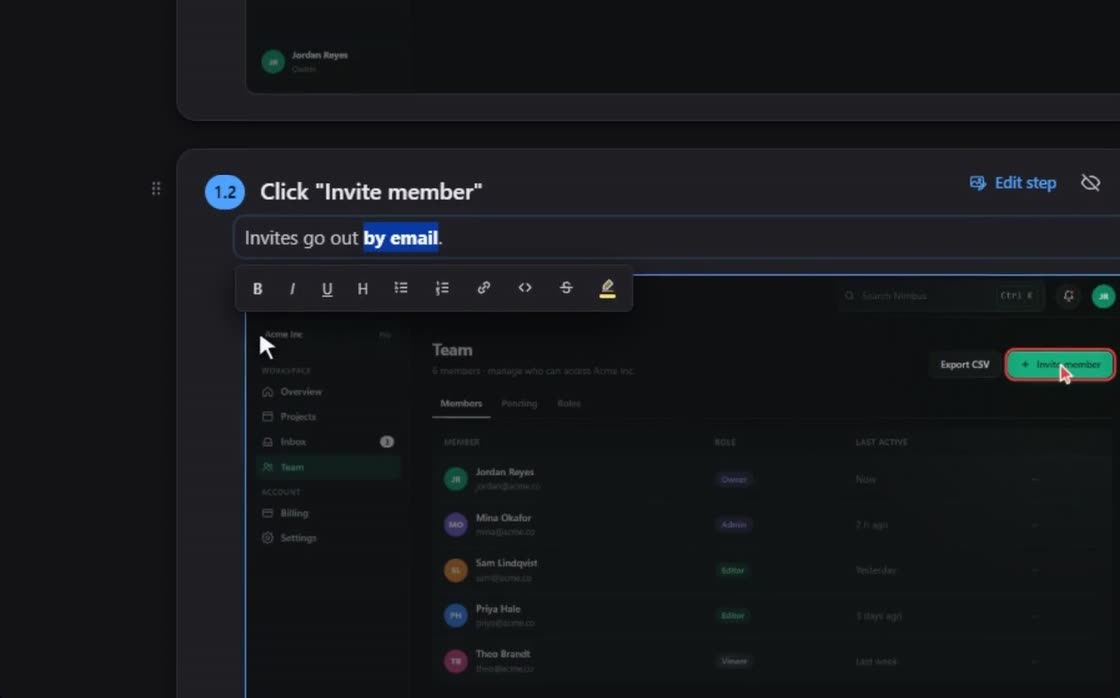
How it works
- Record. Press Record and do the task the way you always do. Every click becomes a step with a screenshot, an outline around what you clicked and a title like "Click Save changes". Typing is captured too, with passwords masked.
- Tidy up (optional). Edit the guide like a document: rewrite titles, add notes and headings, draw arrows and boxes, erase or blur anything private, merge or reorder steps.
- Export. Word, PDF, HTML, Markdown, an animated GIF or an MP4 video, or copy the guide straight into an email, Confluence or Notion. Every format is free.
ClickToDoc and Scribe, side by side
| Feature | Scribe, free plan | ClickToDoc |
|---|---|---|
| Account needed | Yes | No |
| Where your screenshots go | Scribe's servers | Your computer |
| Export to PDF, HTML, Markdown, Word | Not on the free plan | Free |
| Record desktop apps | Pro plan (desktop app) | Free Windows app |
| Hide private details | Manual redaction | Smart redact + erase |
| Paid plans | From $13 per seat a month (5 seats minimum) | None needed |
Scribe figures from scribe.com/pricing, checked on 8 November 2026. Plans change; check there for the latest.
Where Scribe is the better fit
Scribe hosts your guides: you send a link, people open it in the browser, and you can see who viewed what. Teams get a shared workspace. ClickToDoc has no server, so there is no hosted library or viewer analytics. You share a guide as a file (Word, PDF, HTML), paste it into the tool your team already uses, or upload it to your own Google Drive or your own server.
Why people switch
- Privacy. Screenshots of internal tools, customer records and admin pages never leave your computer. That matters in healthcare, finance, education and the public sector.
- Exports. A Word document in your own template, a designed PDF, a self-contained HTML page or Markdown for a docs site, all free.
- Cost. No seats to count. Everyone on the team installs it and makes guides.
- Offline. It works without an internet connection, because nothing needs one.
Questions
Is ClickToDoc really free?
Yes. Recording, editing and every export are free, with no account. There is an optional support button inside the app.
Can I bring my existing Scribe guides?
If you have them as Word, HTML or Markdown, ClickToDoc's Import (in beta) turns a guide back into editable steps with its pictures.
Does it work in Chrome and Edge?
Yes: it is on the Chrome Web Store and Edge Add-ons, and other Chromium browsers such as Brave, Arc, Vivaldi and Opera can install it from either store. For any Windows application there is the Windows app.
How do I share a guide without a hosted link?
Send the Word, PDF or HTML file, paste the guide into an email, Confluence or Notion with Copy guide, or upload it to your own Google Drive or your own server from inside ClickToDoc.
Try it on your next task.
Free on the Chrome Web Store and Edge Add-ons, and the Windows app is on the Microsoft Store.