 ClickToDoc
SOPs and work instructions
Write the SOP by doing the task once.
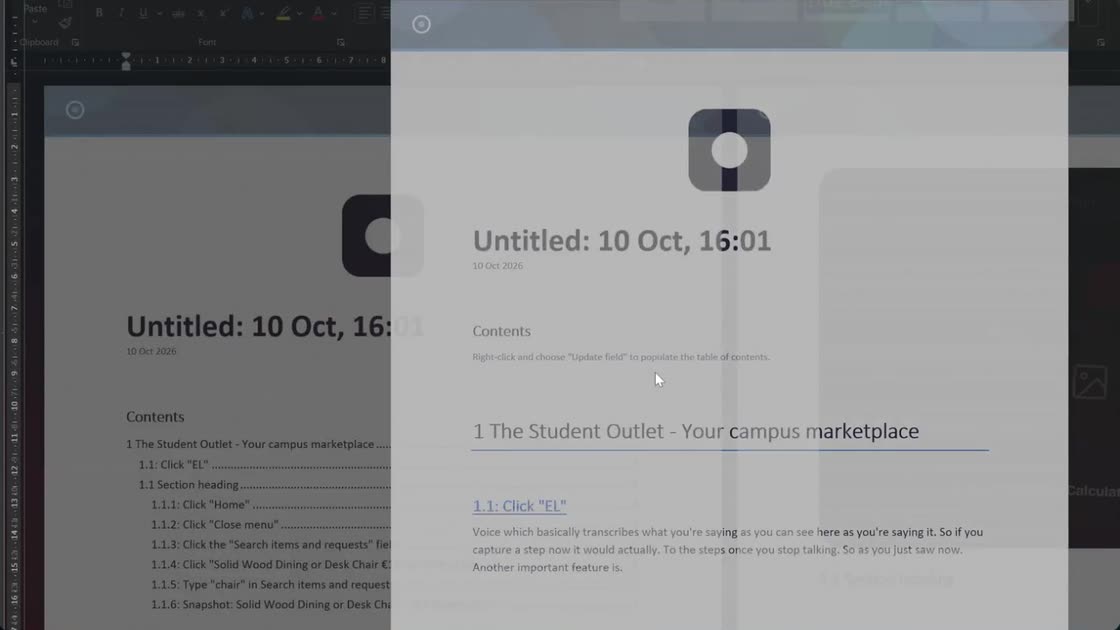
Most SOPs go stale because writing them takes longer than doing the work. With ClickToDoc you do the task once, it captures every step with a screenshot, and you export a clean SOP in your organisation's Word template.
- No account
- Nothing uploaded
- Free, every export
How it works
- Record. Press Record and do the task the way you always do. Every click becomes a step with a screenshot, an outline around what you clicked and a title like "Click Save changes". Typing is captured too, with passwords masked.
- Tidy up (optional). Edit the guide like a document: rewrite titles, add notes and headings, draw arrows and boxes, erase or blur anything private, merge or reorder steps.
- Export. Word, PDF, HTML, Markdown, an animated GIF or an MP4 video, or copy the guide straight into an email, Confluence or Notion. Every format is free.
What a good SOP needs, and how ClickToDoc covers it
- Clear, numbered steps. Step 1, 2, 3, or by section (1.1, 1.2) under headings, with a table of contents in Word, PDF and HTML.
- A picture for every step. The screenshot is taken at the moment you click, with an outline around the right button.
- Warnings and notes. Add coloured notes between steps for the things people get wrong.
- Your branding. Import a Word template (fonts, colours, header, logo) and every SOP comes out matching your document standards.
- Safe to share. Smart redact covers private details while you record; erase and blur anything else before you export.
- Easy to update. The Word and HTML files carry the guide inside them, so you can import an SOP later and edit it instead of starting over.
Who uses it
Operations and quality teams writing work instructions, IT teams documenting procedures, HR and training teams building onboarding guides, and anyone in a regulated field who cannot send screenshots of internal systems to a cloud service. ClickToDoc stores everything on your computer, so there is nothing to approve with your security team before you try it.
Questions
Is this a free SOP template?
Better: it writes the SOP for you from the task itself. You can still start from your own Word template, so the result looks like the rest of your documents.
Can I export an SOP to Word?
Yes, to Word (.docx) with a table of contents, and to PDF, HTML and Markdown. All free.
Can I use AI to write the descriptions?
Optionally. Connect the AI provider you choose, or a local model such as Ollama or LM Studio, and it suggests titles and descriptions. Your redactions are applied before anything is sent.
Does it work for desktop software?
Yes. The free Windows app records any application, and the Chrome and Edge extension records web apps.
Try it on your next task.
Free on the Chrome Web Store and Edge Add-ons, and the Windows app is on the Microsoft Store.